
Set the finished layout
Create the artwork, set its dimensions and arrange every item in your design software. Check spacing, copies, page size and print scale before sending.
SOFTWARE FOR SPECIALISED LASER SYSTEMS
Print from virtually any design package, import existing artwork, or draw and process jobs directly in Forma2D. Choose the workflow that suits you and your Specialised laser.
CHOOSE HOW YOU CREATE
Use the design tools you already know, create directly in Forma2D, or bring existing files into SLS.
Send artwork from virtually any design package capable of printing, using the Specialised Laser printer driver.
02 / DESIGN DIRECTLY IN FORMA2DCreate the design and process the job through Forma2D’s direct machine interface. No printing or exporting.
03 / IMPORT INTO SLSImport existing artwork, then move, reposition and copy it within SLS before preparing the job.
INSIDE SLS
Explore the viewer, material database, image engraving settings and job history. Select a view below to take a closer look.
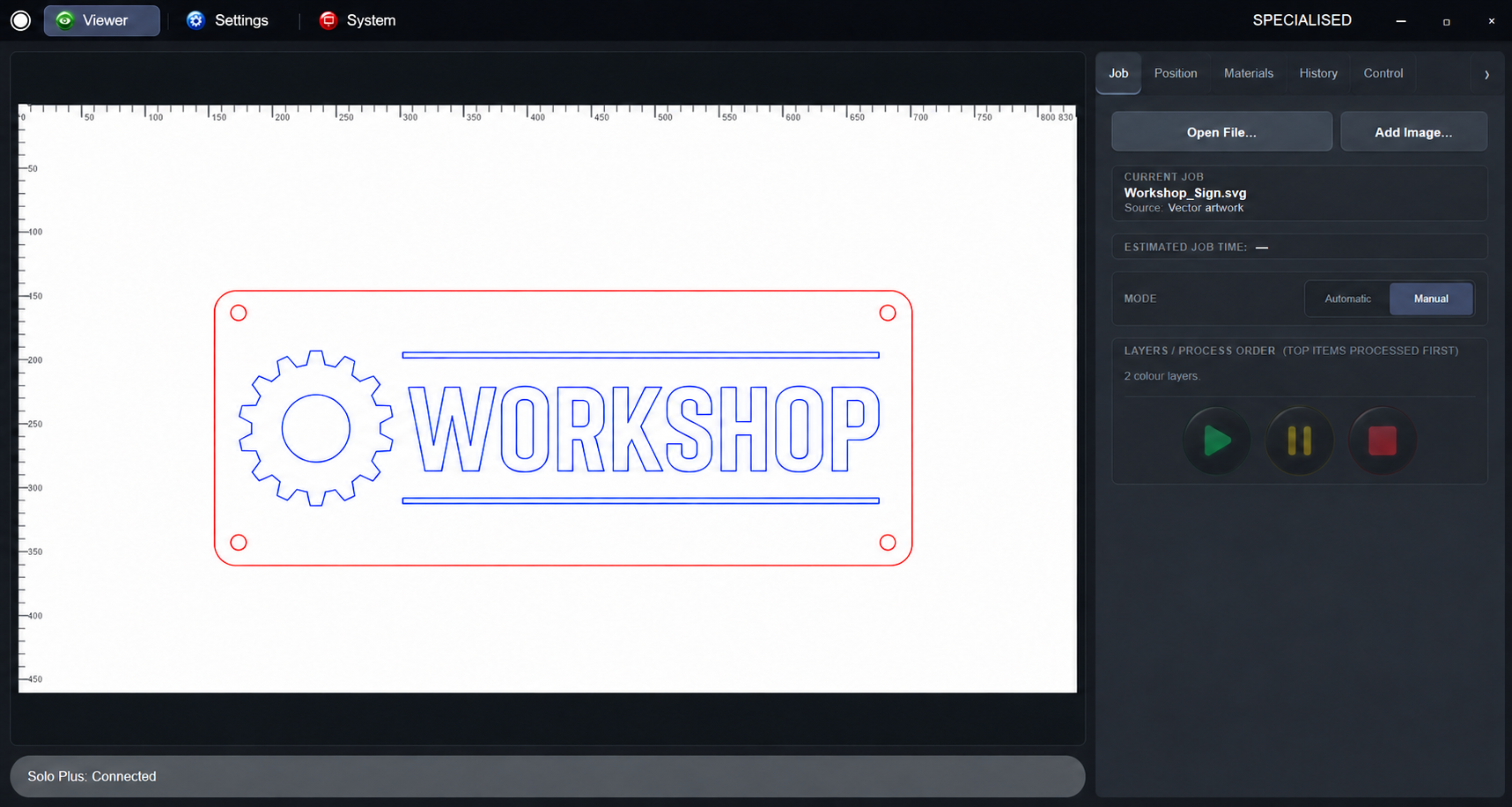
Illustrative interface views with sample artwork, job names and machine status. Select the image to view it full size.
PRINT FROM YOUR DESIGN SOFTWARE
Virtually any design package capable of printing can send artwork to a Specialised laser through the Specialised Laser printer driver. Keep using the application you know: SLS bridges your printed raster images, vector artwork or combined designs to the laser cutter.
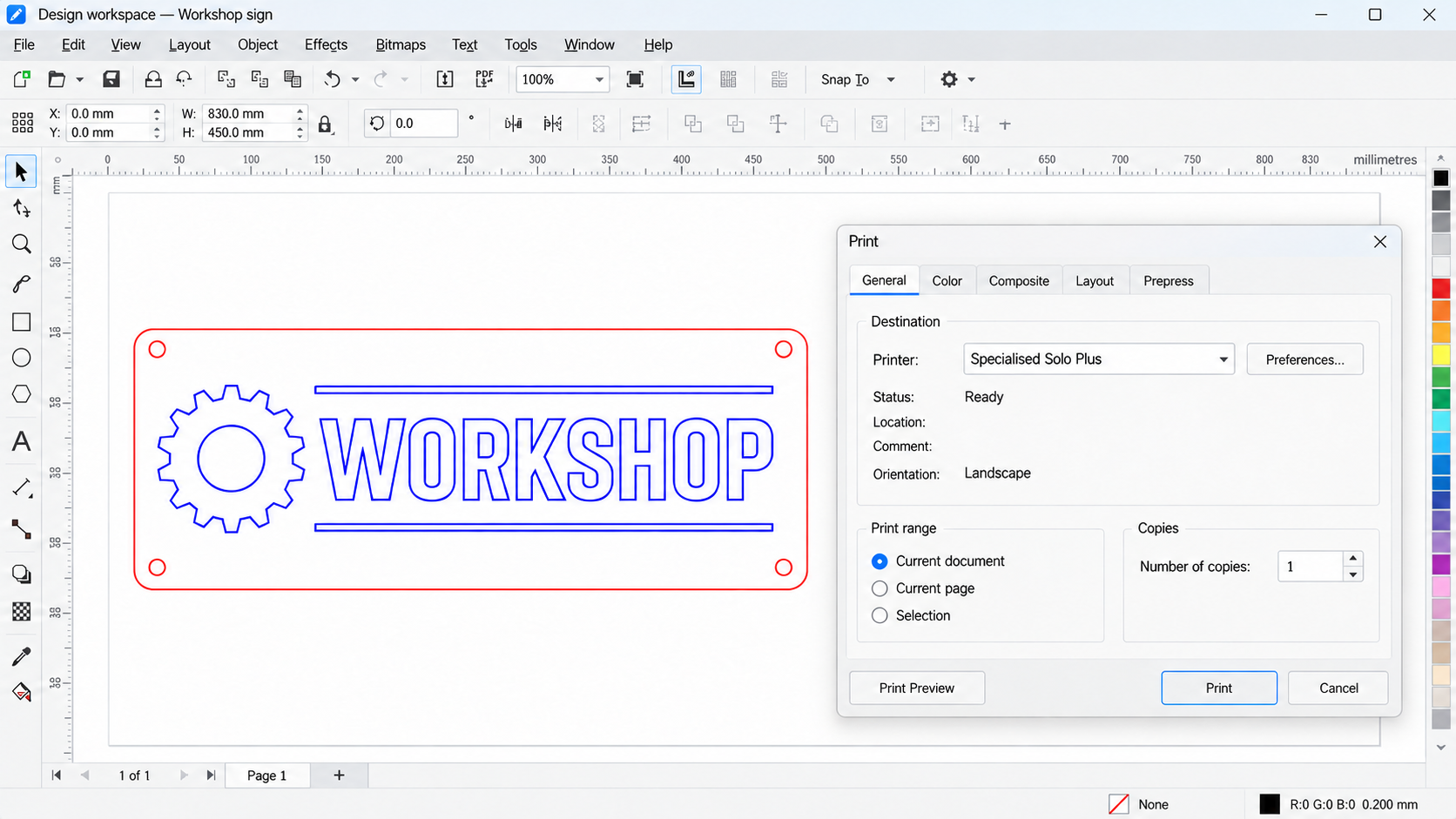
Create the artwork, set its dimensions and arrange every item in your design software. Check spacing, copies, page size and print scale before sending.
Select the Specialised printer driver and print. The artwork and layout arrive in SLS as an immutable print job, ready to review.
Use SLS to review the job, choose material and cutting or engraving settings, then control the laser. Your printed layout stays fixed.
PRINTED JOBS
Print jobs are immutable: artwork, size, position, spacing and the arrangement of copies are set in the source design software. They cannot be moved, resized, rearranged or copied within SLS.
Need to change the design or its layout? Edit the source document and print a new job. Material and machine processing settings are still selected in SLS.
IMPORTED FILES
Direct file import is a separate route. Imported artwork can be moved, repositioned and copied within SLS to arrange the job on the machine bed.
Choose direct printing for a layout prepared in your design software, or file import when you want to arrange the imported artwork in SLS.
Forma2D has its own direct machine interface for Specialised laser systems. Draw and edit your artwork, prepare the job and process it from Forma2D.
No printing or exporting is required. Your drawing and laser workflow stay together in the same application.
Explore the direct Forma2D workflowFor printing from other applications, the Specialised Laser printer driver must be installed on a supported computer and available in the application’s printer list. Printer names and print options depend on your setup. Forma2D’s direct machine workflow does not use this printing step.
FROM PRINT TO FINISHED JOB
Create in the design software you already use, then choose Print to send the artwork through the Specialised Laser printer driver. SLS brings raster and vector work into the same machine workflow.
Open your design application’s Print command and select the Specialised Laser printer driver. Send vector artwork, raster images or a design containing both directly into the Specialised laser workflow.
Prefer to open a file? SLS also imports SVG and DXF vectors, plus JPG, PNG and BMP images.
Printed jobs preserve the artwork, dimensions and spacing set in the source design software. Review this fixed layout in SLS. Imported files can instead be moved, repositioned and copied on the bed.
Use Automatic mode with material settings, or Manual mode to set process values. Prepare vector operations and adjust raster processing for the image.
Check job placement and the readiness information, then start when the controller is connected and ready. The interface brings the job and machine state together.
BUILT AROUND THE PROCESS
The printer driver accepts raster and vector information from compatible design applications. Choose the processing method for each part of the design within the same preparation workflow.
Send vector geometry through the printer driver for cutting and line engraving, or import a vector file. Printed vector layouts stay fixed; imported vector files can be repositioned and copied on the bed before processing.
Print photographs and bitmap artwork directly from your design software. Prepare the image using threshold, greyscale or dithering settings for the intended engraving result.
Review readiness, working-area limits and controller state in the machine workflow before starting the job.
FORMA2D + SPECIALISED LASER SYSTEMS
Design and process directly in Forma2D.
Forma2D is a direct drawing and artwork interface for your Specialised laser. Create and edit your design, prepare the job and process it through Forma2D’s own machine interface.
No printing. No exporting. There is no need to transfer the design to another application: your artwork and machine workflow stay together in Forma2D.
Create geometry and artwork, refine the design and arrange it in Forma2D.
Use Forma2D’s machine interface to prepare the design for your Specialised laser.
Run the job through the direct machine interface, without a print or export step.
START A CONVERSATION
Bring a typical project. Explore printing from your existing design software, working with imported files, or drawing and processing directly in Forma2D.