
Start with your photograph.
Open an image and set its width and resolution. Keep the original proportions or crop to suit the job, then rotate or mirror as needed.
PHOTO LAB / BROWSER PREVIEW
Give your photographs the preparation they deserve before they reach the laser.
Refine the tones, bring out the detail and turn your image into a clean engraving bitmap. Photo Lab puts the original, the dithered result and a material simulation side by side.
Free browser preview · No account needed · Images processed on your device
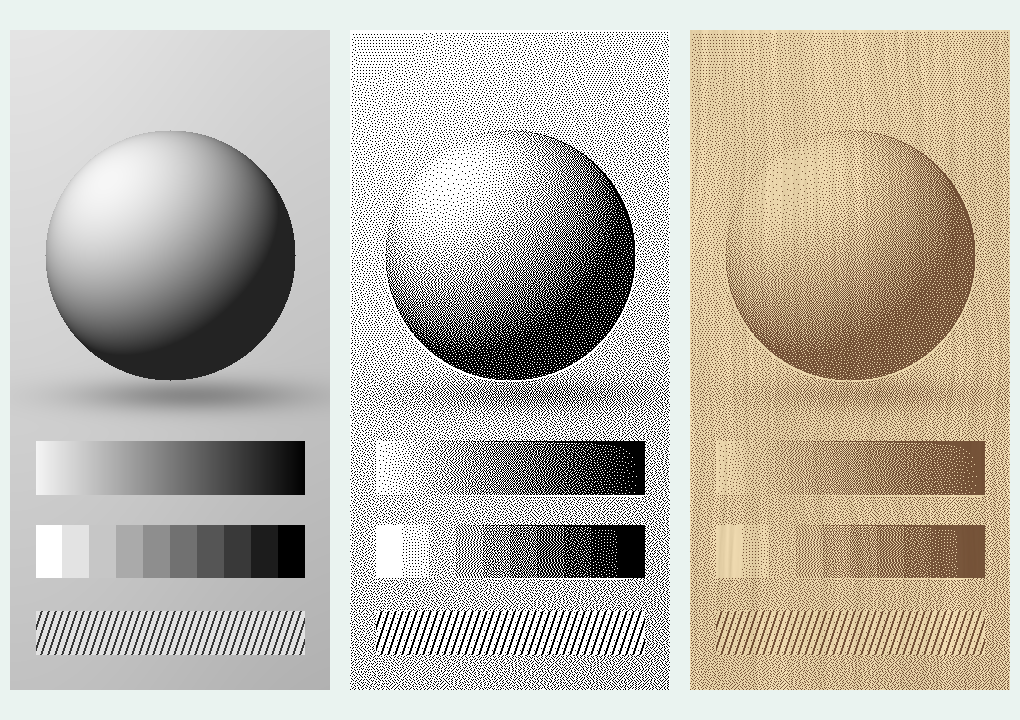
Calibration artwork processed with Photo Lab. The material view is a simulation.
PREPARE. INSPECT. EXPORT.
Work at the final engraving size, inspect the pixels and keep control of each adjustment.
Open an image and set its width and resolution. Keep the original proportions or crop to suit the job, then rotate or mirror as needed.
Adjust brightness, contrast and midtones. Use local contrast, shadow and highlight controls, and gentle sharpening before the image becomes dots.
Choose Stucki, Floyd–Steinberg, an ordered screen or solid threshold. Adjust dot scale and density, and inspect at 100% to see the actual output pixels.
Download a one-bit BMP or PNG at your chosen size and DPI. Import it into your laser workflow, check the dimensions and avoid a second dither where pass-through is available.
SEE IT ON YOUR MATERIAL
Light, medium and dark wood. Clear and coloured acrylic. Slate, leather and anodised aluminium.
Choose a surface and adjust its colour, grain and engraved appearance. Or upload a photograph of your own material to see the image over its actual woodgrain or texture.
For materials that produce light marks, use the inversion control. Mirroring is separate for rear engraving. Save a colour mock-up for discussion, then export the monochrome bitmap for the laser.
Material previews are illustrative. Confirm the result with a sample on your own laser and material.
Last-used settings are remembered in the same browser. Save named presets for repeat work and export them for a backup. Reopen your photographs when you return.
Artwork and material photographs stay in the browser. Photo Lab needs no account and does not upload your images to a server.
Photo Lab prepares the image. Choose power, speed and machine operation in your laser software.
TRY IT WITH YOUR OWN IMAGE
Open Photo Lab, explore the calibration image or start with a photograph.